A markdown is a claim. This one keeps the receipts.
HDScanner watches the Home Depot stores you can actually drive to and tells you when something from the brands you picked genuinely gets cheaper — scored against price history it recorded itself, not against a sticker. It runs on your machine, it costs nothing, and there is no account to make.
This is not a Home Depot product, and I have no relationship with Home Depot. It reads the same public pages the website serves to anyone, slowly, from your own machine. There is nothing to buy and no account to make — the database is a file inside the folder you cloned into, and nothing is sent anywhere.
- cost
- free · open source
- [mit]
- account
- none
- [none to make]
- your data
- stays on your machine
- [local only]
- affiliation
- independent
- [unofficial]
- runs on
- macos · linux
- [python 3.11+]
- setup
- ~5 min · two questions
- [interactive]
- last.verified
- 2026-08-20
nothing to sign up for and nothing to cancel — clone it and it’s yours.
It watches shelves, not search results.
Clearance is local. A tool marked down at your store is often full price two towns over, the markdown rarely surfaces in search, and it is gone quickly. HDScanner takes a handful of stores you could actually drive to, watches only the brands you name, and checks them five times a day.
What comes back isn’t a feed of everything on sale. It’s the things that changed: a fresh clearance tag, a price that dropped, something back in stock, a discount deep enough to be worth the trip. Each one is scored against what the tool has personally seen that item sell for.
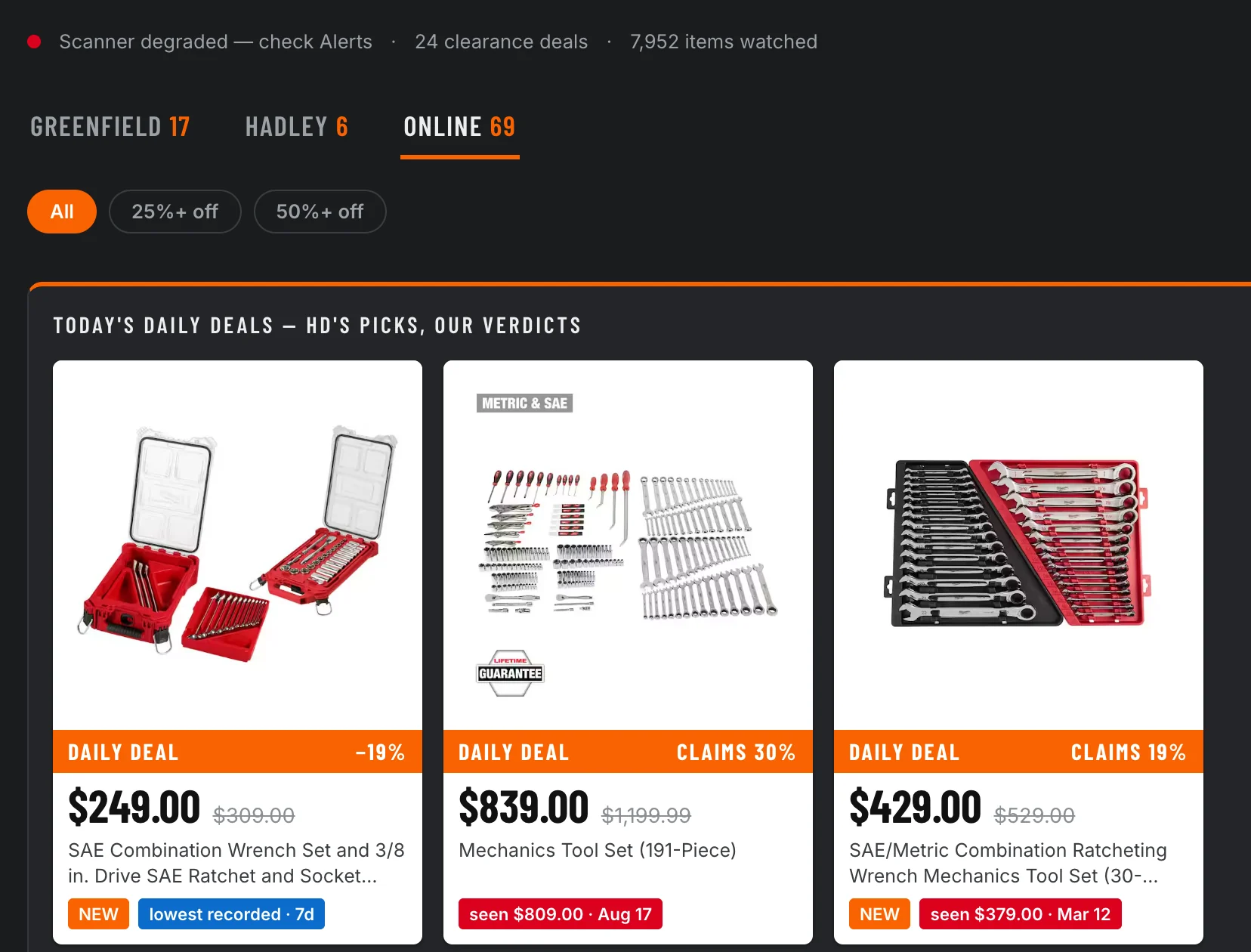
[dashboard · deals · online]
tap to open full size
Two things in that screenshot are worth slowing down on.
The badges under each card are the tool comparing the label against its own notes. A retailer’s percentage is measured against a list price — that’s a legitimate, disclosed convention, and it answers a different question from is this actually cheap right now. On the middle card, advertised at 30% off at $839, the tool had recorded $809 for the same item three days earlier. It doesn’t call that a lie. It shows you both numbers and names what each one measures.
The other thing is the banner at the top, which says the scanner is degraded. That is not a screenshot I forgot to retake. A run that couldn’t see everything is required to say so, and this one is saying so. There’s more on that at the end.
Is this you?
This is for you if you buy from one or two brands, there’s a Home Depot within driving distance, and you’d rather be told than go looking. It isn’t a nationwide deal feed, it won’t help much with things sold online only, and it will not tell you about brands you didn’t ask for.
For a sense of volume: on my install — two stores plus the online catalogue, one brand, just under 8,000 items — it has averaged 28 alerts a week over the last 30 days. Most of those are in-store clearance tags; two or three a week are discounts deep enough that I actually go.
What you need.
- Python 3.11 or newer — already on most Macs and Linux boxes.
- curl — every request goes through it; preinstalled almost everywhere.
- A Home Depot you’d drive to — setup finds your stores from a ZIP code.
- About five minutes — plus 10 to 30 minutes for the first full scan, which is paced on purpose and is not hung.
- Slack, optionally — for push alerts. Everything works without it.
Scheduling installs itself on macOS. On Linux, setup prints the crontab lines for you to paste.
Five minutes, and it only asks you two things.
[bash]
git clone https://github.com/KenStager/HDScanner.git
cd HDScanner

python3 -m venv .venv
source .venv/bin/activate
pip install -e ".[dev,dashboard]"
Then run setup. It asks for a ZIP code and a brand name, and works out everything else itself.
[hd setup]
Where should the data live?
  Use PostgreSQL instead of SQLite? [y/N]:
  Connected to SQLite file ./dev.db
  Schema ready — 6 tables

Which stores should be watched?
  ZIP code: 78701

  #   Store                     Location        Distance
  1   SE Austin (6542)          Austin, TX        3.2 mi
  2   Austin Mueller (6892)     Austin, TX        3.3 mi
  3   South Austin (6570)       Sunset Valley     5.6 mi
  Select store(s), e.g. 1 or 1,3 [1]: 1

Which brands should be tracked?
  Brand name: Ryobi
  RYOBI -> token m5d (2,412 products)

Check it works?
  Working — 329 products, 329 snapshots recorded.
Setup is re-runnable and it verifies before it writes. That last line — Working — 329 products, 329 snapshots recorded — is a live check against the real catalogue, not a summary of what it intends to do. If nothing found your ZIP, it widens to 50 miles, then 100.
Why there’s a setup wizard at all
The two settings that matter can’t be guessed. Store ids aren’t published anywhere obvious, and each brand needs an opaque catalog facet token — Milwaukee is zv — with no public lookup. Set a brand without its token and you get a run that succeeds and scans nothing: no errors, no alerts, and no way to tell that apart from a quiet week. Setup catches it at setup time instead of after seven days of empty output.
Then take a first scan:
[bash]
hd run-once      # 10-30 minutes; paced deliberately, not hung
hd alerts        # see what it found
The first run has nothing to compare against, so it mostly records a baseline. Real alerts start on the second run. If that’s disappointing, it’s the same reason the numbers later are worth anything.
Two jobs, and one of them you must not delete.
Markdowns appear and vanish inside a week, so this is worth running on a schedule. Setup offers to install one; run hd setup again later and skip the steps you already have.
- Scan — five times a day, with one slot timed to Home Depot’s own daily-deals refresh at 3:00 Eastern, converted to your timezone.
- Prune — once a day, deleting raw snapshots past the retention window. Keep this one. Nothing else deletes them, and the database grows without it.
Pruning doesn’t cost you your price history. The raw readings and the price facts live in different tables on purpose, and only the raw ones are disposable.
Three ways to look at it, and you only need one.
The command line.
[bash]
hd alerts --since 24          # last 24 hours
hd alerts --type CLEARANCE    # one kind
hd health                     # is the scanner itself okay?
[hd alerts --since 24]
                              Recent Alerts
+------------------------------------------------------------------------+
| Time              | Store  | Item      | Type            | Details      |
|-------------------+--------+-----------+-----------------+--------------|
| 2026-08-20        | 2619   | 336304558 | CLEARANCE       | 46% off      |
| 16:03:59          |        |           |                 |              |
| 2026-08-20        | 2619   | 330625474 | DEEP_DISCOUNT   | M12 12V      |
| 16:03:59          |        |           |                 | Lithium-Ion  |
| 2026-08-20        | 8452   | 342937465 | CLEARANCE       | 48% off      |
| 00:15:37          |        |           |                 |              |
| 2026-08-20        | 8452   | 336303448 | CLEARANCE       | 43% off      |
| 00:15:37          |        |           |                 |              |
| 2026-08-19        | SYSTEM | SYSTEM    | HEALTH_DEGRADED |              |
| 20:00:10          |        |           |                 |              |
+------------------------------------------------------------------------+
What it watches for.
- CLEARANCE / IN_STORE_CLEARANCE — a markdown tag, either in the network catalogue or physically at one of your stores.
- PRICE_DROP / DEEP_DISCOUNT — it got cheaper; the second one, sharply.
- SPECIAL_BUY — a promotional price rather than a markdown.
- BACK_IN_STOCK / OOS — availability changed at a store you watch.
- PRICING_ERROR — a price so far off its own history that it is probably a mistake.
- HEALTH_DEGRADED — the scanner is having trouble reading, and would rather tell you than quietly return less.
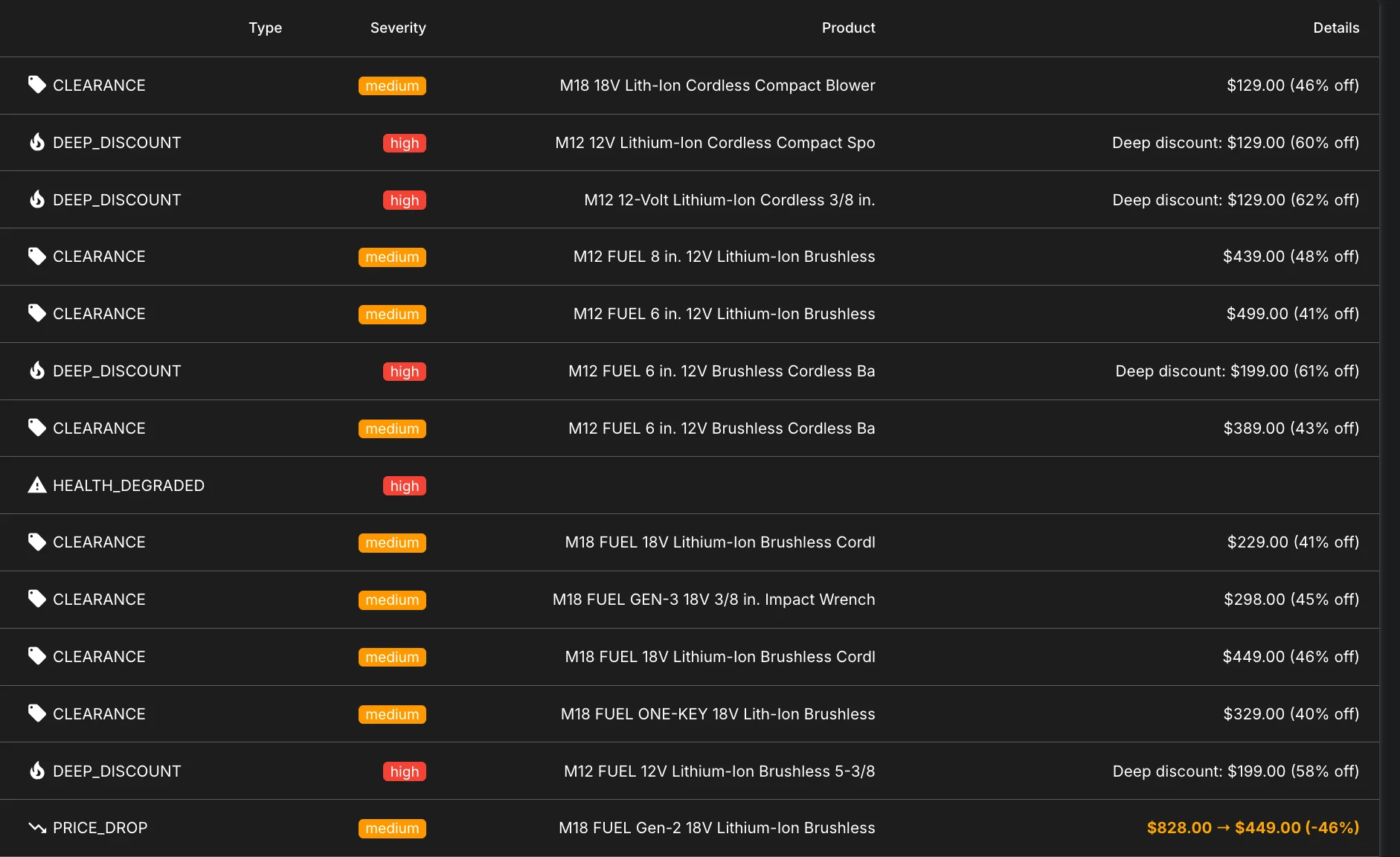
A local web dashboard. hd serve puts it on http://127.0.0.1:8080. It binds to localhost only; there is no hosted version and there isn’t going to be one.
[dashboard · alerts]
tap to open full size
Slack. Setup configures it for you. By hand it’s an app with the chat:write scope, its bot token in .env, and a channel id. Step four is the one everybody misses: /invite @your-app in the target channel. Without it Slack rejects every post with not_in_channel, which looks exactly like a bad token and will cost you twenty minutes.
Every setting, and the two that have to agree.
[.env — written by hd setup]
DATABASE_URL=sqlite+aiosqlite:///./dev.db   # a file in this folder
STORES=6542                                 # store ids, found from your ZIP
BRANDS=Ryobi                                # catalog spelling; case doesn't matter
BRAND_TOKENS=Ryobi:m5d                      # facet token — must cover every brand above
PRODUCT_LINE_FILTERS=                       # optional, e.g. M12,M18
RATE_LIMIT_RPS=0.5                          # a floor, not a tuning knob
SNAPSHOT_RETENTION_DAYS=90                  # raw snapshots only; price facts survive
SLACK_BOT_TOKEN=                            # optional
SLACK_CHANNEL_ID=                           # optional
BRANDS and BRAND_TOKENS belong together, and setup always writes both. Add a brand by hand without its token and the scan skips it silently — the run still succeeds, it just never looks.
Every default ships empty on purpose, so a fresh clone never scans someone else’s neighbourhood.
In roughly the order you’ll hit them.
- “No stores configured.” — expected on a fresh clone; the defaults are empty by design. Run
hd setup. - Slack says
not_in_channel— invite the bot to the channel. - “No brand called X” — the name must match Home Depot’s catalog spelling. Setup suggests near matches;
dewaltfindsDEWALT. - No store found near your ZIP — setup widens to 50, then 100 miles. If nothing turns up, try a neighbouring ZIP.
- A run says “coverage incomplete” — you got throttled. Normal for a burst. Nothing is lost; the next run resumes where this one stopped.
- The database is getting large — the prune job isn’t scheduled.
hd prune --dry-run, thenhd prune. If it refuses, runhd backfill-statsfirst — it’s protecting price history that exists nowhere else. - Alerts stopped appearing —
hd healthreports the last run’s status and whether the API is misbehaving.
[that’s the guide]
That’s everything you need. The tool works the same whether or not you read the rest.
What follows is for anyone who wants to know why it behaves the way it does — why a scan can report failure while still returning results, and why it says “lowest in 42 days” instead of “lowest price.”
A run that couldn’t see everything says so.
The obvious way to build this is a keyword search for the brand, on a schedule. It doesn’t work, and it doesn’t work structurally rather than occasionally. Search excludes brand items outside whatever category you searched, and the API refuses to page past 720 results — so for any brand large enough to matter, there is a tail you cannot read to the end. You would get a scanner that returns results every run and misses most of the clearance, which is the worst possible failure because it looks like success.
So it walks the catalogue’s own structure instead:
- Resolve the brand to its catalog facet token. no public lookup exists; setup does this once and writes it down
- Walk the brand’s own category facets — the data behind the site’s left-hand navigation. the catalog's structure, not a search over it
-
Shelf tier —
storefilter=IN_STORE. everything physically stocked at your stores, swept completely every run -
Network tier —
storefilter=ALL. the full brand catalog, which also carries ship-to-store clearance the in-store filter hides. Categories rotate across runs so each is covered completely when its turn comes - Categories above the API’s reachable ceiling split by subcategory, then by price bracket. anything still unreachable is recorded as truncated
- Both tiers record prices from the same pages, so a newly discovered item is monitored the run it first appears.
- A keyword search never reaches: brand items outside the category you searched · anything past result 720, where the API refuses to page · in-store clearance that was never indexed for search at all.
A run that could not see everything says so. A scan is never allowed to look successful when it was throttled, truncated, or scanning nothing.
That rule is enforced in four places:
- Truncation is recorded, not swallowed. A category the API won’t let you reach the end of is reported as incomplete rather than treated as finished.
- A circuit breaker halts scanning when the error rate climbs, rather than grinding through a bad window and calling the thin result a catalogue.
- Schema drift raises
HEALTH_DEGRADED. When the response shape changes, the parser says so instead of quietly returning zero rows. store_snapshotsis append-only. History is never rewritten, so a bad run can be identified after the fact rather than blended in.
“Lowest in 42 days” is a smaller claim than “lowest ever.” It’s also the only one I can prove.
A deal alert is a claim about the past: this is cheap relative to something. Most tools get that relative-to from the retailer — the was-price, the list price, the strike-through. Those are the seller’s numbers, and they answer the seller’s question.
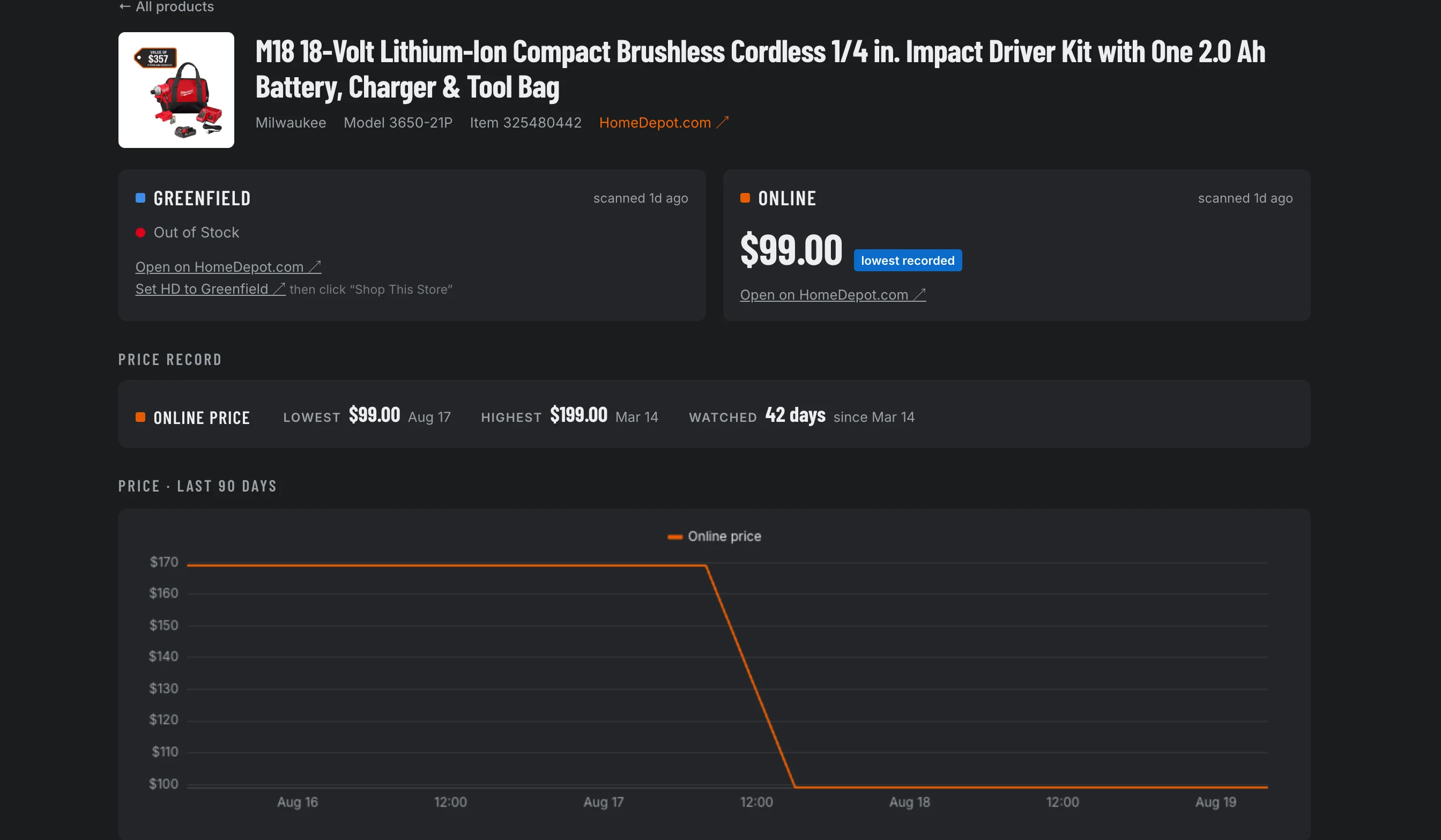
This scores against prices it recorded itself, which makes the claim narrower and makes it true. Every product page states the window it is speaking from:
[dashboard · one product]
tap to open full size
If it has been watching an item for 42 days, it says the lowest in 42 days. It will not round that up to “lowest price,” and it will not quote you a saving it cannot back. An item it met yesterday gets a one-day claim, which is worth exactly what a one-day claim is worth — and saying so is the point.
That is also what makes the daily-deals verdicts possible. Home Depot publishes a set of picks each afternoon with a percentage on each one. The tool checks each pick against its own record and prints both — the advertised number, and what it actually saw.
The guarantee lives in the schema rather than in anybody’s good intentions. store_snapshots is raw and disposable and gets pruned at retention age. item_price_stats is the durable record and survives pruning, because a price fact has to outlive the reading it came from — otherwise every claim the tool makes would get quietly shorter every ninety days. The aggregate is never rebuilt from snapshots in normal operation, since the rows it came from may already be gone.
And the destructive operations refuse to run when price history is uncaptured. hd prune declines rather than delete readings whose facts were never folded forward. The rule isn’t “remember to run backfill first.” The rule is that the system won’t let you skip it.
0.5 requests per second is a floor, not a setting.
RATE_LIMIT_RPS defaults to half a request per second and there is no reason to raise it. Coverage here is bounded by a request budget and category rotation, not by how fast it asks — turning the number up doesn’t find more deals, it just asks harder.
Throttling also shows up in an unusual shape. Home Depot signals it with HTTP 206 and an empty body, not a 429. Read naively, that is indistinguishable from reaching the end of a category — which would produce a run reporting full coverage of a catalogue it never finished reading. The client latches the 206, abandons the run, and reports it.
Run one instance, against your own stores. There is no proxy rotation, CAPTCHA solving or bot evasion here, and adding any would change what this is.
The rule only means something when it costs you.
Here is hd health on my install, the day I wrote this.
[hd health]
Status: DEGRADED
Active products: 7952
Total snapshots: 61291
Latest snapshot: 2026-08-20 16:03:45
Last degraded alert: 2026-08-19 20:00:10
  Zero snapshots — likely API throttling or error responses
A run came back with nothing in it. That could be a quiet night, or it could be the API refusing to talk, and the difference matters enormously to anyone deciding whether to trust the last week of alerts. So it becomes a HEALTH_DEGRADED alert sitting in the same feed as the deals, with the same severity vocabulary — not a line in a log file somebody would have to go looking for.
It would have been easy to publish a screenshot without that banner. I run this thing; I could have waited for a good afternoon.
verified live · 2026-08-20